ویژگیهای سفارشی (Custom Attributes)
Bricks 1.3 امکان افزودن attribute HTML سفارشی به هر المان را میدهد.
attributeهای سفارشی را زیر Style > Attributes اضافه کنید. Name و Value بگذارید و attribute(ها) به relevant node المان اضافه میشوند. پیشفرض روی root node است. علاوه بر مقدار دستی میتوانید داده پویا هم استفاده کنید.
چند attribute (name و value) وارد کنید. در name و value میتوانید Dynamic Data بگذارید.
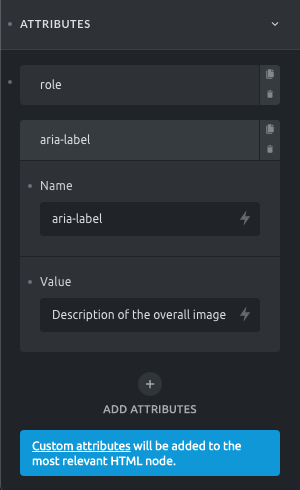
مثال: attribute role و label ARIA روی container چند تصویر که بهعنوان یک تصویر واحد در نظر گرفته میشوند:
- Attribute #1 name: role
- Attribute #1 value: img
- Attribute #2 name: aria-label
- Attribute #2 value: Description of the overall image
HTML container:
<div id="bricks-element-sfglik" class="bricks-element-sfglik bricks-container" role="img" aria-label="Description of the overall image">
... Container elements ...
</div>
attribute سفارشی بر attribute پیشفرض اولویت دارد. اگر alt سفارشی روی Image بگذارید، بهجای alt پیشفرض استفاده میشود.
المانهایی که attribute سفارشی روی tag HTML مشخص اضافه میشود:
| المان Bricks | tag HTML |
|---|---|
| Nav Menu | nav |
| Heading | h1–h6 یا tag heading دیگر |
| Text | p |
| Button | button یا a بسته به وجود لینک |
| Image | img |
| Video | video |
| Form | form |
افزودن Tooltip
Bricks tooltip داخلی (فقط CSS) از طریق attribute سفارشی دارد.
Name را data-balloon و value را متن tooltip بگذارید. attribute دوم data-balloon-pos با یکی از مقادیر:
- top | top-right | top-left
- right
- bottom | top-bottom | top-bottom
- left
لیست کامل attributeهای tooltip در Balloon.css که Bricks استفاده میکند.
یادداشت
برای tooltip روی Icon element، Icon را در Div بپیچید و attribute را روی Div بگذارید. در غیر این صورت CSS کتابخانه balloon CSS آیکون را در فرانتاند نامرئی میکند.
منابع:
- مرجع attribute HTML: https://developer.mozilla.org/en-US/docs/Web/HTML/Attributes