"Filter: bricks/posts/query_vars"
title: "Filter: bricks/posts/query_vars" description: از آنجایی که Bricks 1.3.2 میتوانید پستها، محصولات یا متغیرهای پرسوجو عناصر حلقه Query را قبل از انجام Query به صورت زیر دستکاری کنید:
از آنجایی که Bricks 1.3.2 میتوانید Queryی عناصر پست ها، محصولات یا Query Loop را قبل از انجام Query به این صورت تغییر دهید:
add_filter( 'bricks/posts/query_vars', function( $query_vars, $settings, $element_id, $element_name ) {
    // Use an ACF custom field to restrict the query to a set of posts
    if ( $element_id == 'fhmnfx' && function_exists('get_field') ) {
        $query_vars['post__in'] = get_field('my_posts_acf_field');
    }

    return $query_vars;
}, 10, 4 );
پاسخ تماس فیلتر سه آرگومان دریافت میکند:
$query_varsیک آرایه انجمنی که برای تغذیه کلاس WP_Query استفاده میشود$settingsیک آرایه انجمنی حاوی تنظیمات عنصر تنظیم شده در سازنده$element_idرشته ای است حاوی شناسه عنصر منحصر به فرد (@since 1.3.6)$element_nameرشته ای است حاوی نام عنصر (@since 1.11.1)
یادداشت
اگر میخواهید $query_vars را برای درخواست محصول WooCommerce در Bricks تغییر دهید، آرگومان اولویت را به مقدار بالاتری مانند 20 یا 30 افزایش دهید. اگر این کار را انجام ندهید میتواند منجر به لغو بالقوه فیلتر شما توسط کد دیگری شود که به این فیلتر متصل میشود.
مثال: حلقه تصاویر از Metabox.io Advanced Image فیلد پست فعلی
add_filter( 'bricks/posts/query_vars', function( $query_vars, $settings, $element_id, $element_name ) {

    // Only target yeamho element_id
    if ( $element_id !== 'yeamho') return $query_vars;

    // Get Metabox advanced images field values. 'mg_projet_galerie_images' is the field id
    $gallery_images = (array) rwmb_meta( 'mg_projet_galerie_images', ['size' => 'full'] );

    // Get the Images Ids only
    $gallery_images_ids = array_keys($gallery_images);

    // If no gallery images, set empty string array
    $gallery_images_ids = count( $gallery_images_ids ) > 0 ? $gallery_images_ids : [''];

    // Set the images ids as post__in parameters
    $query_vars['post__in'] = $gallery_images_ids;

    return $query_vars;
}, 10, 4 );
مثال: از شناسههای تصاویر گالری ACF طبقهبندی فعلی برای حلقه پرسش رسانه (نغزنده قابل نصب) استفاده کنید
اگر میخواهید یک اسلایدر پویا در قالب بایگانی ترم بسازید، میتوانید حلقه Query را در اسلاید مانند تصویر زیر تنظیم کنید، و از قطعه کد زیر برای بازیابی شناسههای تصاویر از قسمت گالری برای هر عبارت استفاده کنید، سپس آنها را به پارامتر post__in اختصاص دهید.

add_filter( 'bricks/posts/query_vars', function( $query_vars, $settings, $element_id, $element_name ) {
  // Only target udcvuw element_id
  if ( $element_id == 'udcvuw' && function_exists('get_field') ) {
    // Set to 0, ensure no results by default
    $query_vars['post__in'] = [0];
    $current_term = get_queried_object();

    // Check if the current page is a term archive
    if( is_a( $current_term, 'WP_Term' ) ) {
      // Get the images associated with the current term, region_-_banniere is the field name
      $images = get_field('region_-_banniere', 'region_'. $current_term->term_id );

      // Check if images exist and if there's more than 0 images
      if( is_array( $images ) && count( $images ) > 0 ) {
        // Get the IDs of the images (if this field return format is array)
        $images_ids = wp_list_pluck( $images, 'ID' );
        // Set the query to include only posts with these image IDs
        $query_vars['post__in'] = $images_ids;
      }
    }
  }
  return $query_vars;
}, 10, 4 );
مثال: آرگومان orderby را با 2 فیلد مختلف اعمال کنید
تصور کنید یک نوع پست عملکرد با یک فیلد تاریخ شروع و یک فیلد زمان شروع دریافت کرده اید. از آنجایی که پست عملکرد را بر اساس توالی واقعی ایجاد نمیکنید، میخواهید پست های عملکرد را بر اساس تاریخ شروع (صعودی) و زمان شروع (نزولی) سفارش دهید.
از 1.11.1، میتوانید در رابط کاربری Query Loop به این امر دست یابید. this را بررسی کنید.
add_filter( 'bricks/posts/query_vars', function( $query_vars, $settings, $element_id, $element_name ) {

    // Only target 3b03dd element_id
    if( $element_id !== '3b03dd') return $query_vars;

    // Set meta_query
    $query_vars['meta_query'] = [
        'relation' => 'AND',
        'performance_start_date' => array(
            'key' => 'performance_start_date',
            'compare' => 'EXISTS',
        ),
        'performance_start_time' => array(
            'key' => 'performance_start_time',
            'compare' => 'EXISTS',
        ),
    ];

    // Set orderby
    $query_vars['orderby'] = [
        'performance_start_date' => 'ASC',
        'performance_start_time' => 'DESC'
    ];

    return $query_vars;
}, 10, 4 );
مثال: دریافت محصولات مرتبط با WooCommerce
با تنظیمات زیر یک حلقه Query ایجاد کنید
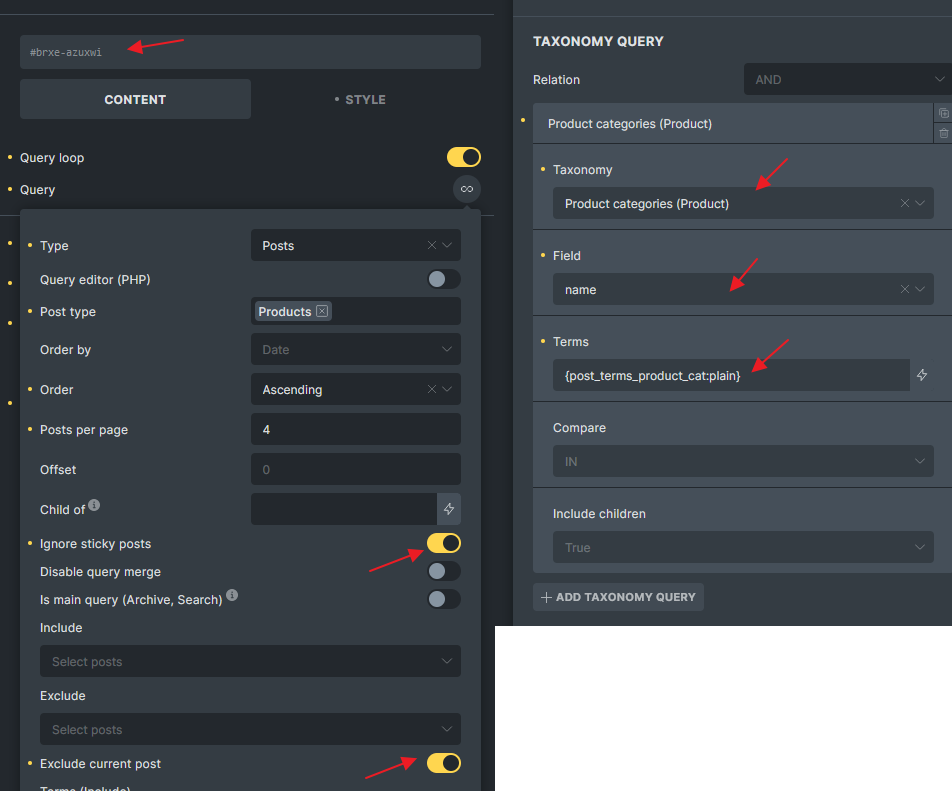
add_filter( 'bricks/posts/query_vars', function( $query_vars, $settings, $element_id, $element_name ) {
    if( $element_id !== 'azuxwi' ) return $query_vars;

    $product_id = get_the_ID();
    $product = wc_get_product( $product_id );

    if( ! is_a( $product, 'WC_Product' ) ) return $query_vars;
    // Exclude the upsell products
    $upsell_ids = $product->get_upsell_ids();

    if( count( $upsell_ids ) > 0 ) {
        if( isset( $query_vars['post__not_in'] ) ) {
            $query_vars['post__not_in'] = array_merge( $query_vars['post__not_in'], $upsell_ids );
        } else {
            $query_vars['post__not_in'] = $upsell_ids;
        }
    }

    return $query_vars;
}, 10, 4);
مثال: Get WooCommerce Upsell Products
یک حلقه Query با تنظیمات زیر ایجاد کنید:
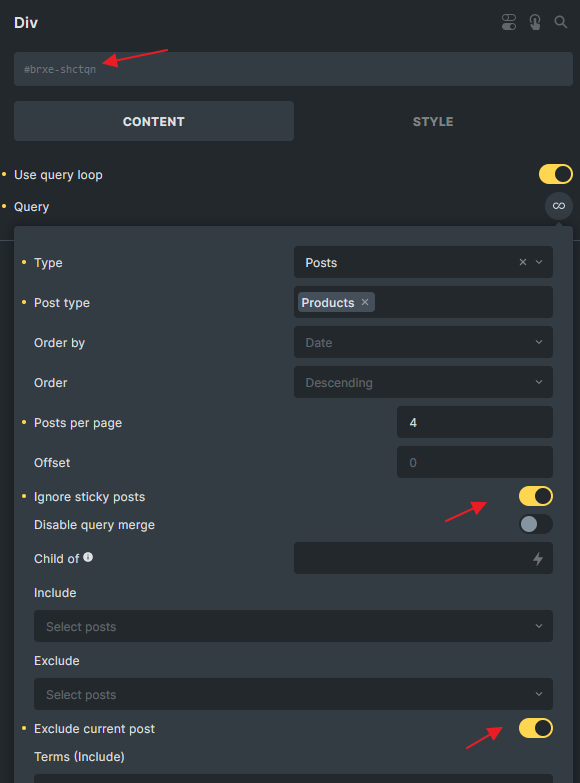
add_filter( 'bricks/posts/query_vars', function( $query_vars, $settings, $element_id, $element_name ) {
    // Change the Id
    if( $element_id !== 'shctqn') return $query_vars;

    $product_id = get_the_ID();
    $product = wc_get_product( $product_id );

    if( ! is_a( $product, 'WC_Product' ) ) return $query_vars;

    $upsell_ids = $product->get_upsell_ids();
    $query_vars['post__in'] =  ( count( $upsell_ids ) > 0 )? $upsell_ids : [0] ;
        // in case your have product variation set as upsell
        $query_vars['post_type'] = ['product', 'product_variation'];

    return $query_vars;
}, 10, 4 );
روش های مختلف برای هدف قرار دادن Query غیر از $element_id
گاهی اوقات ممکن است بخواهید با استفاده از $element_id به جای یک المان خاص، گروهی از Queryها را هدف قرار دهید.
از تابع تگ شرطی وردپرس استفاده کنید
// Target any query in an archive page
add_filter( 'bricks/posts/query_vars', function( $query_vars, $settings, $element_id, $element_name ) {

  if( ! is_archive() ) return $query_vars;

  // Perform your logic here

  return $query_vars;
}, 10, 4 );
بررسی کنید که آیا کلاس CSS در عنصر query وجود دارد یا خیر
// Target any query if 'my-custom-class' set on the query element in STYLE > CSS > CSS Classes
add_filter( 'bricks/posts/query_vars', function( $query_vars, $settings, $element_id, $element_name ) {

  $css_class = isset( $settings['_cssClasses'] ) ? $settings['_cssClasses'] : '';

  if( $css_class === '' || strpos( $css_class, 'my-custom-class' ) === false ) {
    return $query_vars;
  }

  // Perform your logic here

  return $query_vars;
}, 10, 4 );

// Target any query if 'my-custom-class' global class set on the query element
add_filter( 'bricks/posts/query_vars', function( $query_vars, $settings, $element_id, $element_name ) {

  $global_css_classes = isset( $settings['_cssGlobalClasses'] ) ? \Bricks\Element::get_element_global_classes( $settings['_cssGlobalClasses'] ) : [];

  if( empty( $global_css_classes ) || ! in_array( 'my-custom-class', $global_css_classes ) ) {
    return $query_vars;
  }

  // Perform your logic here

  return $query_vars;
}, 10, 4 );