"Filter: bricks/element/render"
Bricks 1.5 فیلتر جدید bricks/element/render را معرفی میکند. این فیلتر شما را قادر میسازد تا منطق نمایش شرطی خود را بهصورت برنامهنویسی پیادهسازی کنید.
این برای محدود کردن محتوای ممتاز به کاربران خاص و غیره ایدهآل است.
اگر شرط داخل این فیلتر برآورده نشود (یعنی false را برمیگرداند)، المان در فرانتاند نمایش داده نمیشود.
add_filter( 'bricks/element/render', function( $render, $element ) {
  // Conditional display logic goes here:
  // $render = true to render the element
  // $render = false to skip the element render

  return $render;
}, 10, 2 );
یادداشت
Bricks شرایط المان را در نسخه 1.5.4 معرفی کرد. از این فیلتر PHP برای سناریوهای پیچیدهتر استفاده کنید.
Example 1: Output a specific element if the visitor is logged-in
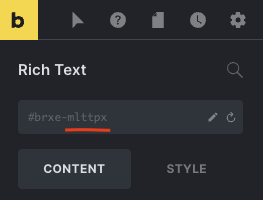
در مثال زیر، بررسی میکنیم که آیا المان دارای شناسه المان خاصی است یا خیر، و اگر چنین است، اجازه میدهیم المان بر اساس شرایط ورود/خروج رندر شود.
add_filter( 'bricks/element/render', function( $render, $element ) {
  // Render element ID "mlttpx" if user is logged in
  if ( $element->id === 'mlttpx' ) {
    return is_user_logged_in();
  }

  return $render;
}, 10, 2 );
Example 2: Don't output elements with a specific custom CSS class for users with a subscriber role
اگر کاربر وارد شده باشد و مشترک نباشد، مثال زیر یک المان را در صورتی که دارای کلاس CSS سفارشی hide-for-subscribers باشد، ارائه میکند.
میتوانید [قابلیتهای کاربران] (https://wordpress.org/support/article/roles-and-capabilities/) مختلف را بر اساس نیاز خود انتخاب کنید.
add_filter( 'bricks/element/render', function( $render, $element ) {
  // Get the element CSS classes
  $classes = ! empty( $element->attributes['_root']['class'] ) ? $element->attributes['_root']['class'] : false;

  // Check if the element has the special class "hide-for-subscribers"
  if ( $classes && in_array( 'hide-for-subscribers', $classes ) ) {
    return current_user_can( 'edit_posts' );
  }

  return $render;
}, 10, 2 );
Example 3: Output elements for a specific post category
مثال زیر یک المان خاص را بر اساس شناسه HTML در یک صفحه پست با یک دسته خاص ارائه میدهد:
add_filter( 'bricks/element/render', function( $render, $element ) {
  // Check if this is a single post page
  if ( ! is_single() ) {
    return $render;
  }

  // Get the element custom HTML ID
  $html_id = isset( $element->settings['_cssId'] ) ? $element->settings['_cssId'] : false;

  // Check if the element has the HTML ID "project-award"
  if ( $html_id && $html_id === 'project-award' ) {
    return has_category( 'projects' );
  }

  return $render;
}, 10, 2 );
Example 4: Output elements having a class of "logged-in" to logged-in users and elements having a class of "logged-out" to non logged-in visitors
مثال زیر عناصری را که کلاس logged-in دارند فقط برای کاربرانی که وارد سیستم شده اند و عناصری که کلاس logged-out دارند فقط برای کاربرانی که از سیستم خارج شده اند ارائه میکند:
add_filter( 'bricks/element/render', function( $render, $element ) {
  // Get the element CSS classes
  $classes = ! empty( $element->attributes['_root']['class'] ) ? $element->attributes['_root']['class'] : false;

  // Check if the element has the special class "logged-in"
  if ( $classes && in_array( 'logged-in', $classes ) ) {
  return is_user_logged_in();
  }

  // Check if the element has the special class "logged-out"
  if ( $classes && in_array( 'logged-out', $classes ) ) {
  return ! is_user_logged_in();
  }

  return $render;
}, 10, 2 );
Example 5: Output an element having a specific HTML ID based on value of a custom field
مثال زیر المانی را ارائه میکند که دارای شناسه HTML مشخص شده بر اساس مقدار یک فیلد سفارشی خاص از پست فعلی هنگام مشاهده یک صفحه منفرد است:
// Render an element with "project-award" HTML ID if the specified condition is true.
// Condition: The value of a custom field "dont_output_project_award" is false.
add_filter( 'bricks/element/render', function( $render, $element ) {
  // Check if this is a singular page
  if ( ! is_singular() ) {
    return $render;
  }

  // Get the element custom HTML ID
  $html_id = isset( $element->settings['_cssId'] ) ? $element->settings['_cssId'] : false;

  // Check if the element has the HTML ID "project-award"
  if ( $html_id && $html_id === 'project-award' ) {
    return ! get_post_meta( $element->post_id, 'dont_output_project_award', true );
  }

  return $render;
}, 10, 2 );
مثالهای بالا واقعاً فقط برای نشان دادن چند مورد استفاده ساده هستند. هر چیزی را که بتوانید با PHP بررسی کنید، میتوانید با استفاده از این فیلتر bricks/element/render جدید در منطق نمایش شرطی خود بگنجانید.
Example 6: Output an element in ACF Repeater if the sub field is not empty
سناریو:
ACF Repeater: سوالات متداول
فیلدهای فرعی: سؤال، پاسخ، متن دکمه و URL دکمه
نیاز: زمانی که نوع Query Loop روی این ACF Repeater تنظیم میشود، یک Button (المان فرزند Repeater) را فقط در ردیفهایی که مقدار Button Text تنظیم شده دارند، خروجی بگیرید.
// Output one or more instances of the specified element (inside a query loop of ACF Repeater type) when the condition is true.
// Condition: The specified sub field inside the specified ACF Repeater field is not empty.
add_filter( 'bricks/element/render', function( $render, $element ) {
  if ( $element->id === 'huciku' && class_exists( 'ACF' ) ) {
    if ( have_rows( 'faqs' ) ) {
      // Loop through rows.
      while( have_rows( 'faqs' ) ) : the_row();
        return get_sub_field( 'button_text' );
      // End loop.
      endwhile;
    }
  }

  return $render;
}, 10, 2 );
که در آن huciku شناسه المان دکمه است.
توجه: این به عنوان کلاس brxe-huciku در خروجی در این مورد اعمال خواهد شد، نه یک شناسه.
همچنین، رشته های faqs و button_text را در صورت لزوم جایگزین کنید.