ساخت تگ داده پویا سفارشی (Dynamic Data Tag)
این مقاله برای توسعهدهندگانی است که میخواهند یک تگ داده پویا سفارشی در builder ایجاد کنند.
نتیجه مورد نظر باید شبیه مثال زیر باشد: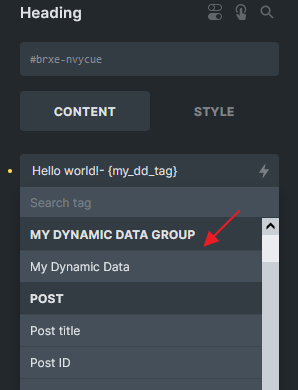
یک تگ پویا سفارشی با برچسب "My Dynamic Data"
مرحله 1: ثبت یک برچسب از طریق فیلتر: bricks/dynamic_tags_list
از فیلتر bricks/dynamic_tags_list برای ارائه تگ داده پویا سفارشی خود در سازنده استفاده کنید.
add_filter( 'bricks/dynamic_tags_list', 'add_my_tag_to_builder' );
function add_my_tag_to_builder( $tags ) {
  // Ensure your tag is unique (best to prefix it)
  $tags[] = [
    'name'  => '{my_dd_tag}',
    'label' => 'My Dynamic Data',
    'group' => 'My Dynamic Data Group',
  ];

  return $tags;
}
مرحله 2: چندین فیلتر را قلاب کنید
1) bricks/data_dynamic/render_tag
زمانی که \Bricks\Integrations\Dynamic_Data\Providers::render_tag() برای تجزیه یک تگ خاص فراخوانی میشود از این مورد استفاده میشود.
add_filter( 'bricks/dynamic_data/render_tag', 'get_my_tag_value', 20, 3 );
function get_my_tag_value( $tag, $post, $context = 'text' ) {
  if( ! is_string( $tag ) ) {
    return $tag;
  }
  // $tag is the tag name with the curly braces after priority 10
  // Replace all curly braces
  $clean_tag = str_replace( [ '{', '}' ], '', $tag );

  // Only look for dynamic tag my_dd_tag
  if ( $clean_tag !== 'my_dd_tag' ) {
    return $tag;
  }

  // Do your custom logic here, you should define run_my_dd_tag_logic() function
  $value = run_my_dd_tag_logic();

  return $value;
}

function run_my_dd_tag_logic() {
  // Do your custom logic here
  $my_value = 'My dynamic data value:';

  return $my_value;
}
اگر قصد دارید آرگومانی مانند "my_dd_tag:arg1" را بپذیرید، ممکن است لازم باشد منطق را مطابق با آن تنظیم کنید. در اینجا یک مثال اساسی با استفاده از منطق PHP آورده شده است. برای سناریوهای پیچیدهتر، میتوانید منطق را در صورت نیاز تطبیق دهید:
add_filter( 'bricks/dynamic_data/render_tag', 'get_my_tag_value', 20, 3 );
function get_my_tag_value( $tag, $post, $context = 'text' ) {
  if( ! is_string( $tag ) ) {
    return $tag;
  }

  // $tag is the tag name with the curly braces after priority 10
  // Replace all curly braces
  $clean_tag = str_replace( [ '{', '}' ], '', $tag );

  // Only look for dynamic tag starts with my_dd_tag:
  if ( strpos( $clean_tag, 'my_dd_tag:' ) === false ) {
    return $tag;
  }

  // Get argument
  $argument = str_replace( 'my_dd_tag:', '', $clean_tag );

  // Do your custom logic here, you should define run_my_dd_tag_logic() function
  $value = run_my_dd_tag_logic( $argument );

  return $value;
}

function run_my_dd_tag_logic($argument) {
  // Do your custom logic here
  $my_value = 'My dynamic data value: ' . $argument ;

  return $my_value;
}
2) bricks/data_dynamic/ render_content and bricks/frontend/render_data
هنگامیکه \Bricks\Integrations\Dynamic_Data\Providers::render_content() برای تجزیه رشتههایی که ممکن است حاوی برچسبهای پویا مختلفی در محتوا باشند، فراخوانی میشود، استفاده میشود. یکی از توابعی که این عمل را انجام میدهد bricks_render_dynamic_data() است.
توجه
هنگام کار روی این بخش احتیاط بیشتری به خرج دهید، زیرا هرگونه استفاده نادرست ممکن است عملکرد تگهای پویا را در کل وبسایت مختل کند.
add_filter( 'bricks/dynamic_data/render_content', 'render_my_tag', 20, 3 );
add_filter( 'bricks/frontend/render_data', 'render_my_tag', 20, 2 );
function render_my_tag( $content, $post, $context = 'text' ) {

  // $content might consists of HTML and other dynamic tags
  // Only look for dynamic tag {my_dd_tag}
  if ( strpos( $content, '{my_dd_tag}' ) === false ) {
    return $content;
  }

  // Do your custom logic here, you should define run_my_dd_tag_logic() function
  $my_value = run_my_dd_tag_logic();

  // Replace the tag with the value you want to display
  $content = str_replace( '{my_dd_tag}', $my_value, $content );

  return $content;
}
اگر تگ پویا شما آرگومان را میپذیرد، مثال زیر را در نظر بگیرید:
add_filter( 'bricks/dynamic_data/render_content', 'render_my_tag', 20, 3 );
add_filter( 'bricks/frontend/render_data', 'render_my_tag', 20, 2 );
function render_my_tag( $content, $post, $context = 'text' ) {

  // $content is the content of the element, including other dynamic tags, HTML, etc.
  // Only look for content starts with {my_dd_tag:
  if ( strpos( $content, '{my_dd_tag:' ) === false ) {
    return $content;
  }

  // Regex to match my_dd_tag: tag
  preg_match_all( '/{(my_dd_tag:[^}]+)}/', $content, $matches );

  // Nothing grouped in the regex, return the original content
  if ( empty( $matches[0] ) ) {
    return $content;
  }

  foreach ( $matches[1] as $key => $match ) {
    $tag = $matches[0][ $key ];

    // Get the dynamic data value, $match is the tag name without the curly brackets
    // Can reuse the get_my_tag_value function created earlier
    $value   = get_my_tag_value( $match, $post, $context );

    // Replace the tag with the transformed value
    $content = str_replace( $tag, $value, $content );
  }

  return $content;
}
توجه
اگر تگ پویا شما روی المان تصویر (context: image) استفاده میشود، مطمئن شوید که آرایهای با شناسههای تصویر برمیگردانید. به مثال در تاپیکهای انجمن ما مراجعه کنید: دادههای پویا به درستی در المان تصویر ارائه نشدهاند